Online Time Clock for Your Employees: Simple, Fast, Nothing to Install
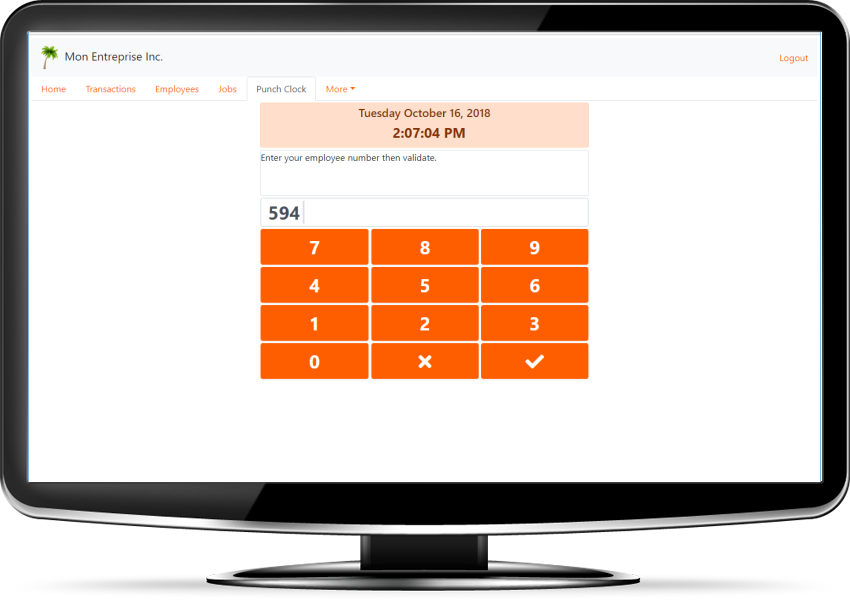
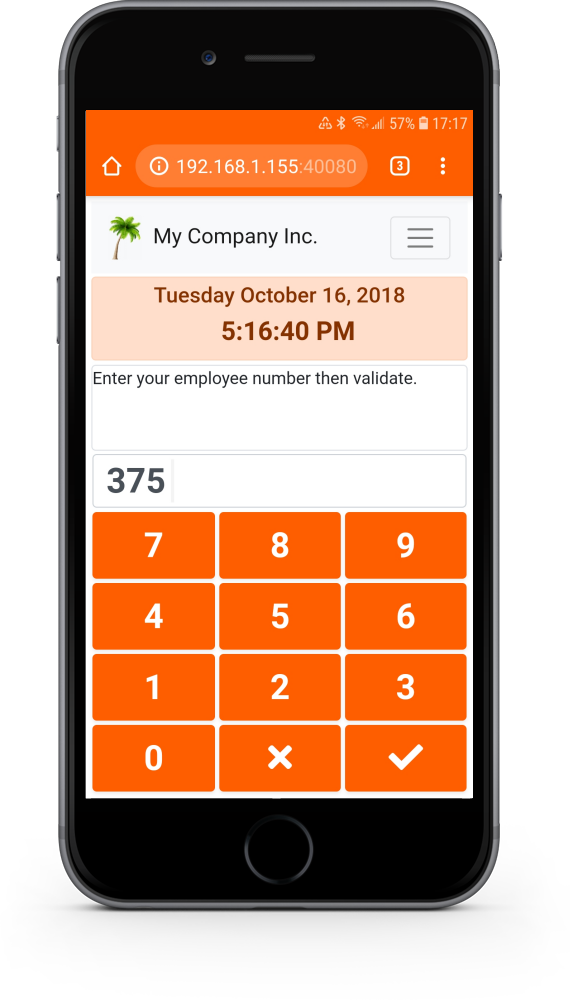
PunchAnyWhere.com is a cloud-based online time clock (also called a punch clock or employee time tracking software) built in Canada for small and medium-sized businesses. Your employees punch in and out with their PIN from a computer, tablet or smartphone. Hours are calculated automatically and can be exported to Excel or CSV for payroll.
Why choose PunchAnyWhere.com?
- No more paper timesheets. Hours are calculated for you, with no math errors.
- Ready today. Create your free account, add your employees, and they can punch in right away.
- One tool for every location. Factory, branches or job sites: everyone punches in the same place, even across time zones.
- Control your labour costs. Track hours worked per job in real time, against your budget.
- Simpler payroll. Export hours to Excel or CSV whenever you want, for example every week.
How does it work?
- Create your free account. It's free for 30 days.
- Add your employees (and your jobs, if you need them).
- Your employees punch in. They enter their employee number and PIN, and that's it.
- Export the hours for payroll.
A flexible online time clock. No problem!
- Several punch stations? No problem! Employees can punch at the same time from multiple computers in your factory or your branches.
- Need to track time by job? No problem! Turn on job management when you need it to see how much time is worked on each job.
- Want to limit where employees can punch? No problem! Restrict the allowed IP addresses in the settings.
- Another question? No problem! See the frequently asked questions below.
Main features
- Time rounding. Round punch-in times to the next quarter hour, half hour or hour, and punch-out times to the previous quarter hour, half hour or hour. Example: John punches in at 7:47 a.m. and out at 12:03 p.m. PunchAnyWhere.com rounds to 8:00 a.m. and 12:00 p.m., for a total of 4 hours.
- All time zones. Set the time zone in each employee's record and conversion is automatic. Example: when a Montreal employee (GMT -05:00) punches at 1:00 p.m., the transaction of a Paris employee (GMT +01:00) shows 7:00 p.m.
- Job management. Enter a budget in hours and minutes for each job. See hours worked versus budget in real time, how many employees are on each job, and which job each employee is working on.
- Touchscreens and barcode readers. Install a touchscreen so employees punch directly on it. They can also use a mouse, a keyboard, a simple numeric keypad or a barcode reader.
- Secure employee access. Two passwords: one for administration and one for punching only. If an employee closes the browser, they can sign back in themselves without access to admin options.
- Accents and special characters. PunchAnyWhere.com is fully Unicode compliant: accented, Chinese, Greek and special characters are saved, displayed and exported correctly.
- Automatic backups. Your data is safe in data centres located in Quebec and backed up regularly. You don't have to do anything.
Frequently asked questions
How does the online time clock work?
Create a free account for 30 days, add your employees (and jobs, if needed), and they can punch right away. To punch, the employee enters their employee number and PIN. If you use jobs, they also enter a valid job number. At the end of the shift, they punch out. You then export the hours to Excel or CSV for payroll.
How much does an online time clock cost?
PunchAnyWhere.com costs $1.89 CAD per employee per month after the free 30-day trial. You get 10% off from 25 employees, 15% from 50, 20% from 100, and up to 50% off from 1000 employees. All amounts are in Canadian dollars.
Do I need to install any software?
No. PunchAnyWhere.com is 100% online. All you need is a web browser and an internet connection, on a computer, tablet or smartphone.
Do I need a credit card for the free trial?
No. No credit card is required to create your account and enjoy the 30-day free trial.
If an employee leaves and I hire a replacement, do I pay for an extra employee?
No. Only employees with the "Active" status count toward your subscription. Set the departing employee to inactive and create the new one. The former employee's data stays available in your reports.
Is support included?
Yes. Support is free and included with every subscription. Sign in to your account and use the "Information or support request" option.
Can I fix a forgotten punch-out or a wrong job number?
Yes. You can add, delete or adjust transactions at any time. The original transaction data is kept for your records.
Does it work with touchscreens and barcode readers?
Yes. It works on tablets, smartphones and touchscreen monitors. Employees can also punch with a mouse, a keyboard, a numeric keypad or a barcode reader.
What if an employee closes the browser?
No problem. With two passwords (administration and punch only), employees can sign back in themselves with the same email address, without access to admin options.
How do I export hours for payroll?
Under the Reports option, several reports are available, including time transactions or time reports by employee, which you can export to Excel, CSV, or other formats whenever you like.
From $1.89 CAD per employee per month
After your free 30-day trial, the subscription costs $1.89 CAD per active employee per month. The bigger your team, the bigger the discount:
- 10% off from 25 employees
- 15% off from 50 employees
- 20% off from 100 employees
- Up to 50% off from 1000 employees
Support included. All amounts are in Canadian dollars (CAD). Prices are subject to change without notice.
To see the complete price list, sign in to your account.

About us

PunchAnyWhere.com is a Canadian company that develops online time clock software to calculate your employees' hours worked. The company is based in Quebec.
Our goal: offer a punch clock (also called a time clock or electronic punch) that is simple to use and, above all, easy to set up. Our customers, mostly small and medium-sized businesses, can then focus on their business, not on installing and maintaining complex, expensive software.
That's why our software is 100% cloud-based and hosted on our servers. A browser and an internet connection are all you need to access it anytime, from anywhere.
No account yet? Create your free 30-day account. A question before you start? Read the FAQ or write to us.
Contact us
Email us at info@PunchAnyWhere.com or use our contact form.